
Notice
Recent Posts
Recent Comments
Link
| 일 | 월 | 화 | 수 | 목 | 금 | 토 |
|---|---|---|---|---|---|---|
| 1 | 2 | 3 | 4 | 5 | 6 | 7 |
| 8 | 9 | 10 | 11 | 12 | 13 | 14 |
| 15 | 16 | 17 | 18 | 19 | 20 | 21 |
| 22 | 23 | 24 | 25 | 26 | 27 | 28 |
| 29 | 30 | 31 |
Tags
- 동적 프로그래밍 방법
- 인프런
- cs
- 알고리즘
- Less
- MySQL
- 이진탐색
- 네트워킹데이
- 인프런워밍업클럽
- Pager
- 터미널
- 오블완
- spring boot
- mycli
- 스터디2기
- zsh theme
- 분할정복 방법
- oh-my-zsh
- 데이크스트라
- 순차탐색
- 욕심쟁이 방법
- table status
- 맥
- 오일러 경로
- 티스토리챌린지
- zsh
- VI
- CS스터디
- mysql 표
- mysql 표 출력
Archives
- Today
- Total
Develop
[Spring Boot] 게시판 - 18. 이메일 인증 구현 본문
안녕하세요 ~ .ᐟ
오늘은 Spring Boot에서 이메일 인증 시스템을 구현하는 방법을 정리해보겠습니다.
목표
- Gmail SMTP를 이용한 이메일 전송
- 6자리 인증 코드 생성 및 검증
- 인증 코드 만료 시간 관리 (10분)
- 회원가입 전 이메일 인증 필수화
1. 의존성 추가
- Spring에서 이메일을 보내려면 spring-boot-starter-mail 의존성이 필요합니다.
- 이 라이브러리는 JavaMailSender 인터페이스를 제공하여 SMTP 서버를 통한 이메일 발송을 가능하게 합니다.
implementation 'org.springframework.boot:spring-boot-starter-mail'
2. Entity 설계
- verificationCode: 사용자에게 전송할 6자리 인증 코드
- expiryDate: 인증 코드 만료 시간 (보안을 위해 10분으로 제한)
- verified: 인증 완료 여부 (중복 인증 방지)
isExpired() 메서드를 엔티티에 두어 만료 여부 판단 로직을 캡슐화했습니다.
더보기
@Entity
@Getter
@NoArgsConstructor(access = AccessLevel.PROTECTED)
public class EmailVerification extends BaseEntity {

    @Id
    @GeneratedValue(strategy = GenerationType.IDENTITY)
    private Long id;

    @Column(nullable = false)
    private String email;

    @Column(nullable = false)
    private String verificationCode;

    @Column(nullable = false)
    private LocalDateTime expiryDate;

    @Column(nullable = false)
    private boolean verified = false;

    @Builder
    public EmailVerification(String email, String verificationCode, LocalDateTime expiryDate) {
        this.email = email;
        this.verificationCode = verificationCode;
        this.expiryDate = expiryDate;
    }

    public void verify() {
        this.verified = true;
    }

    public boolean isExpired() {
        return LocalDateTime.now().isAfter(expiryDate);
    }
}
3. Repository
- findByEmailAndVerificationCodeAndVerifiedFalse: 아직 인증되지 않은 코드만 조회
- findTopByEmail...: 가장 최근에 발송한 인증 요청만 가져오기 (재전송 시 이전 코드 무시)
더보기
public interface EmailVerificationRepository extends JpaRepository<EmailVerification, Long> {

    Optional<EmailVerification> findByEmailAndVerificationCodeAndVerifiedFalse(
        String email, String verificationCode);

    Optional<EmailVerification> findTopByEmailOrderByCreatedAtDesc(String email);
}
4. Gmail SMTP 설정
- 이메일을 발송할 Gmail 과 앱비밀번호가 필요합니다.
- 실제 Gmail 비밀번호가 아닌 앱 비밀번호를 사용하는 이유는 보안 때문입니다. 코드에 비밀번호가 노출되더라도 해당 앱만 차단하면 됩니다.
더보기
// Gmail 앱 비밀번호 발급

1. Google 계정 관리 → 보안
2. 2단계 인증 활성화
3. 앱 비밀번호 생성 → "메일" 선택
4. 생성된 16자리 비밀번호를 `.env` 파일에 저장
// application.yml
spring:
  mail:
    host: smtp.gmail.com
    port: 587
    username: ${MAIL_USERNAME}
    password: ${MAIL_PASSWORD}
    properties:
      mail:
        smtp:
          auth: true
          starttls:
            enable: true
            required: true

// .env
MAIL_USERNAME=your-email@gmail.com
MAIL_PASSWORD=your-app-password
5. EmailService 구현
- 코드 생성: 100000~999999 사이의 6자리 난수
- DB 저장: 코드와 만료 시간을 함께 저장
- 이메일 발송: JavaMailSender를 통해 SMTP로 전송
- 검증: 코드 일치 여부 + 만료 시간 체크 + verified 플래그 업데이트
더보기
@Service
@RequiredArgsConstructor
public class EmailService {

    private final JavaMailSender mailSender;
    private final EmailVerificationRepository verificationRepository;

    @Value("${spring.mail.username}")
    private String fromEmail;

    public void sendVerificationEmail(String toEmail) {
        // 1. 6자리 랜덤 코드 생성
        String code = generateVerificationCode();

        // 2. 만료 시간 설정 (10분)
        LocalDateTime expiryDate = LocalDateTime.now().plusMinutes(10);

        // 3. DB 저장
        EmailVerification verification = EmailVerification.builder()
            .email(toEmail)
            .verificationCode(code)
            .expiryDate(expiryDate)
            .build();
        verificationRepository.save(verification);

        // 4. 이메일 전송
        sendEmail(toEmail, "이메일 인증 코드",
            "인증 코드: " + code + "\n유효시간: 10분");
    }

    private String generateVerificationCode() {
        return String.valueOf(100000 + new Random().nextInt(900000));
    }

    private void sendEmail(String to, String subject, String text) {
        SimpleMailMessage message = new SimpleMailMessage();
        message.setFrom(fromEmail);
        message.setTo(to);
        message.setSubject(subject);
        message.setText(text);

        mailSender.send(message);
    }

    public void verifyEmail(String email, String code) {
        EmailVerification verification = verificationRepository
            .findByEmailAndVerificationCodeAndVerifiedFalse(email, code)
            .orElseThrow(() -> new IllegalArgumentException("잘못된 인증 코드입니다."));

        if (verification.isExpired()) {
            throw new IllegalArgumentException("인증 코드가 만료되었습니다.");
        }

        verification.verify();
    }
}
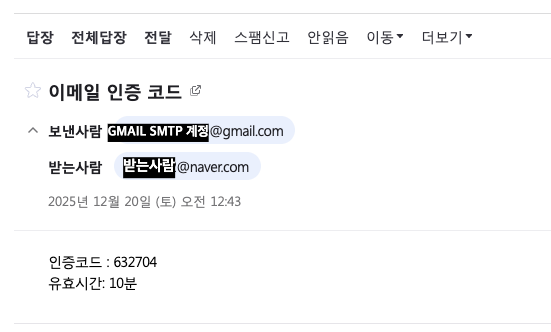
발송된 이메일
- 인증코드, 유효시간 발송
6. AuthService와 UserService 역할 분리
- AuthService: "회원가입"이라는 비즈니스 프로세스 관리 (이메일 인증 → 사용자 생성 → 토큰 발급)
- UserService: User 엔티티에 대한 CRUD 로직만 담당
이렇게 하면 관리자가 사용자를 직접 생성할 때는 UserService만 사용하고, 일반 회원가입 플로우는 AuthService를 사용할 수 있습니다.
AuthService (회원가입, 인증, 로그인)
더보기
@Service
@RequiredArgsConstructor
public class AuthService {

    private final UserService userService;
    private final EmailService emailService;
    private final EmailVerificationRepository verificationRepository;

    @Transactional
    public ApiResponse<UserResponse> signup(UserRequest.SignUp request) {
        // 1. 이메일 인증 확인
        EmailVerification verification = verificationRepository
            .findTopByEmailOrderByCreatedAtDesc(request.getEmail())
            .orElseThrow(() -> new IllegalArgumentException("이메일 인증이 필요합니다."));

        if (!verification.isVerified()) {
            throw new IllegalArgumentException("이메일 인증을 완료해주세요.");
        }

        // 2. 사용자 생성 (UserService에 위임)
        User user = userService.create(request);

        // 3. 응답 반환
        return ApiResponse.success(UserResponse.from(user));
    }
}
UserService (회원 관리, 프로필, 비밀번호 변경 등)
- JWT 는 email 을 기반으로 하므로, UserService 에 email 기반 메서드 추가
- PasswordChangeRequest DTO로 현재 비밀번호 검증 후 변경처리
더보기
@Service
@RequiredArgsConstructor
public class UserService {

    private final UserRepository userRepository;
    private final PasswordEncoder passwordEncoder;

    @Transactional
    public User create(UserRequest.SignUp request) {
        // 중복 체크
        if (userRepository.existsByEmail(request.getEmail())) {
            throw new IllegalArgumentException("이미 존재하는 이메일입니다.");
        }

        // 비밀번호 암호화
        String encodedPassword = passwordEncoder.encode(request.getPassword());

        // User 생성 및 저장
        User user = User.builder()
            .email(request.getEmail())
            .password(encodedPassword)
            .name(request.getName())
            .role(Role.USER)
            .build();

        return userRepository.save(user);
    }
}
7. Controller 책임 분리
- AuthController : 회원가입, 로그인, 토큰 갱신, 이메일 인증
- UserController : 인증된 사용자 본인의 정보 관리 (/users/me)
- AdminController : 전체 사용자 조회 (/users) - ADMIN 권한 필요
더보기
@RestController
@RequestMapping("/api/auth")
@RequiredArgsConstructor
public class AuthController {

    private final EmailService emailService;
    private final AuthService authService;

    @PostMapping("/email/send-verification")
    public ResponseEntity<ApiResponse<Void>> sendVerification(
        @RequestParam String email) {

        emailService.sendVerificationEmail(email);
        return ResponseEntity.ok(
            ApiResponse.success(null, "인증 코드가 전송되었습니다."));
    }

    @PostMapping("/email/verify")
    public ResponseEntity<ApiResponse<Void>> verifyEmail(
        @RequestParam String email,
        @RequestParam String code) {

        emailService.verifyEmail(email, code);
        return ResponseEntity.ok(
            ApiResponse.success(null, "이메일 인증이 완료되었습니다."));
    }

    @PostMapping("/signup")
    public ResponseEntity<ApiResponse<UserResponse>> signup(
        @Valid @RequestBody UserRequest.SignUp request) {

        return ResponseEntity.ok(authService.signup(request));
    }
}
API 설계 개선
| 기능 | 기존 | 개선 | 이유 |
| 회원가입 | POST /users | POST /auth/signup | 인증 관련 기능은 /auth로 통합 |
| 내 정보 조회 | GET /users/{userId} | GET /users/me | JWT 토큰 기반, 보안 강화 |
| 정보 수정 | PUT /users/{userId} | PUT /users/me | 본인 정보만 수정 가능 |
| 비밀번호 변경 | 없음 | PUT /users/me/password | 별도 엔드포인트로 분리 |
| 프로필 이미지 | PUT /users/{userId} | PUT /users/me/profile-image | Content-Type 분리 (multipart) |
느낀 점
- 이메일 인증 시스템을 구현하면서 서비스 계층의 역할 분리에 대해 고민하는 계기가 되었다.
- AuthService 로 회원 가입 (이메일 인증 -> 사용자 생성 -> 토큰 발급)
- UserService 는 User 엔티티의 CRUD 담당
- 그 외 이메일 도메인은 추후 비밀번호 찾기, 알림메일 발송 등을 위해 분리된 도메인으로 설계했다.

'백엔드 > 게시판 만들기' 카테고리의 다른 글
| [Spring Boot] 게시판 - 19. 비동기 처리로 사용자 응답 속도 개선하기 (feat. K6 성능 테스트) (0) | 2025.12.30 |
|---|---|
| [Spring Boot] 게시판 - 17. JWT 인증에 권한 관리 더하기 - @PreAuthorize로 메서드 레벨 보안 구현 (0) | 2025.12.18 |
| [Spring Boot] 게시판 - 16. JWT 적용 + 스테이징 배포 트러블슈팅 기록 (1) | 2025.12.17 |
| [Spring Boot] 게시판 - 15. JWT 인증 구현하기 (Token 기반으로 전환) (0) | 2025.12.16 |
| [Spring Boot] 게시판 - 14. Spring Security 로그인 구현 (0) | 2025.12.14 |
'백엔드/게시판 만들기' Related Articles
more
